



How Context Optimization Makes AI Coding Agents More Efficient
AI coding agents need better context. Selecting, compressing, and retrieving the right information can reduce waste across the entire agent workflow.





In the Amazon Aurora ecosystem, I/O (Input/Output) is often the silent budget killer. Every read and write operation adds up, and in the Standard configuration, those millions of requests create a bill that is as volatile as it is expensive.
To address this, AWS introduced Aurora I/O-Optimized. It promises predictable spend by turninge volatile I/O operationsצ costst into fixed instance and storage costst. But here is the reality: it isn’t always the most efficient route. To push your cloud further, you need to know exactly when to make the switch and when to stay put.
Choosing a configuration is a shift in your fundamental cost structure:
The catch: This is a cluster-level decision. Before moving, you must identify specific I/O patterns to ensure the math actually works in your favor.
To drive real value, we analyze three key metrics - I/O Requests, Instances, and Storage Usage. Here is how to extract the data from your environment:
1. Isolate the I/O Source, and its cost
Filter your billing data by Service (RDS) and Usage type (Aurora - I/O requests). Grouping by Resource reveals the specific cluster ARNs driving your costs. In our example, a single cluster is driving $260.00 per month of I/O requests.
2. Audit Instance Costs
Now it’s time to link I/O usage to instances. This allows you to calculate the exact 30% price jump required for the I/O-Optimized tier.
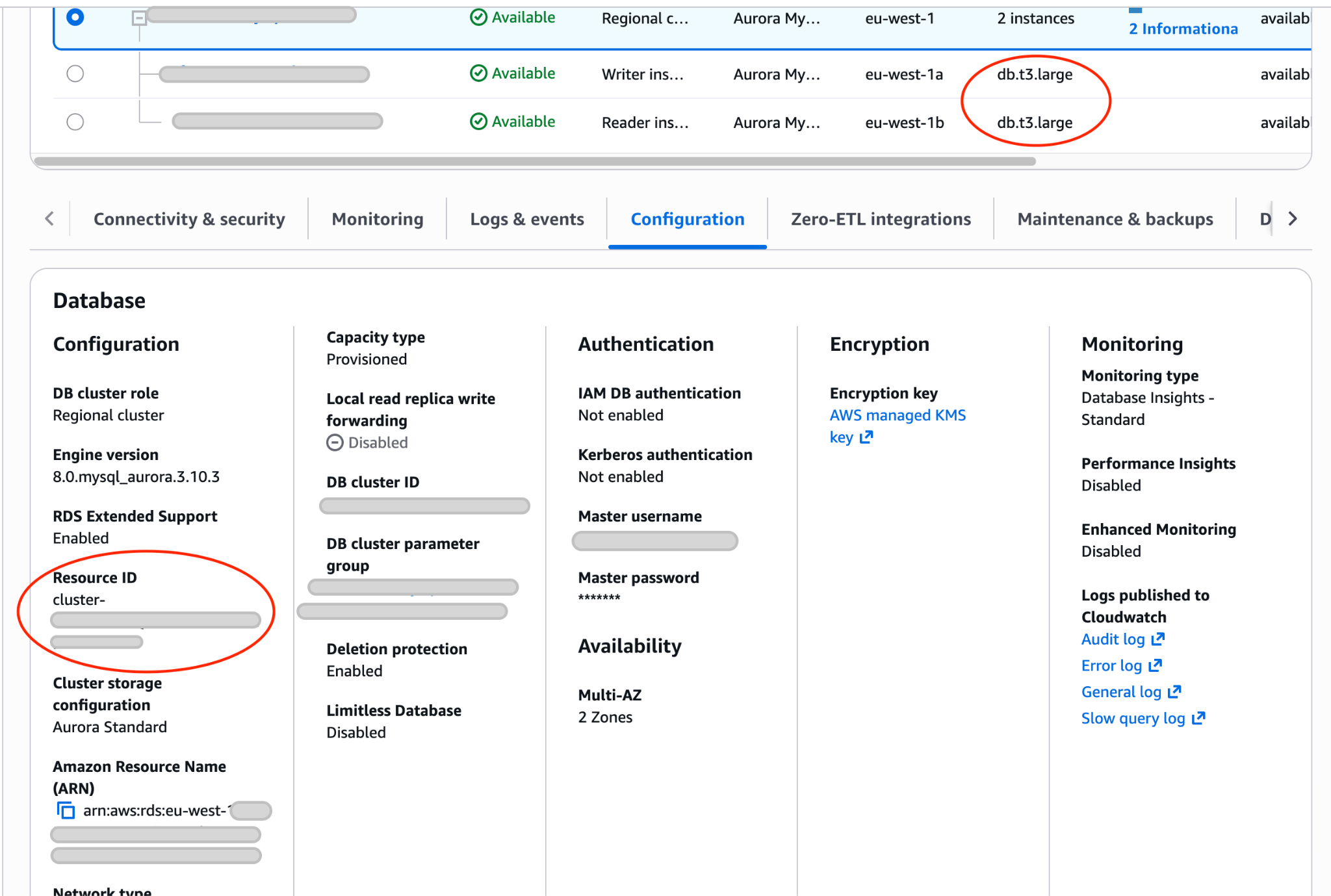
In the billing data, you won’t see the instances linked to the cluster ARN. To do that, open the AWS Console, go to Aurora and RDS, Databases. By clicking on a cluster and then the Configuration tab, you will be able to spot the ARN of that cluster.
In our example below, this is a cluster of 2 db.t3.large instances.
3. Evaluate Storage Usage
The price per GB increases in the Optimized tier, but this is usually secondary to the instance and I/O shift. Don’t let a 40% storage increase distract you if the I/O savings are massive.
To calculate that filter for Aurora: StorageUsage Usage type and the desired ARN in the Resource filter in Cost Explorer, and then choose Dimension: Usage type. This view will show you the exact GB usage of the cluster.
4. The Breakeven Calculation
Once the data is clear, the decision is binary. You are looking for the point where your current I/O spend exceeds the projected increase in fixed costs.
Look at this real-world scenario for a single cluster using 2 db.t3.large instances of Amazon Aurora PostgreSQL-Compatible Edition:
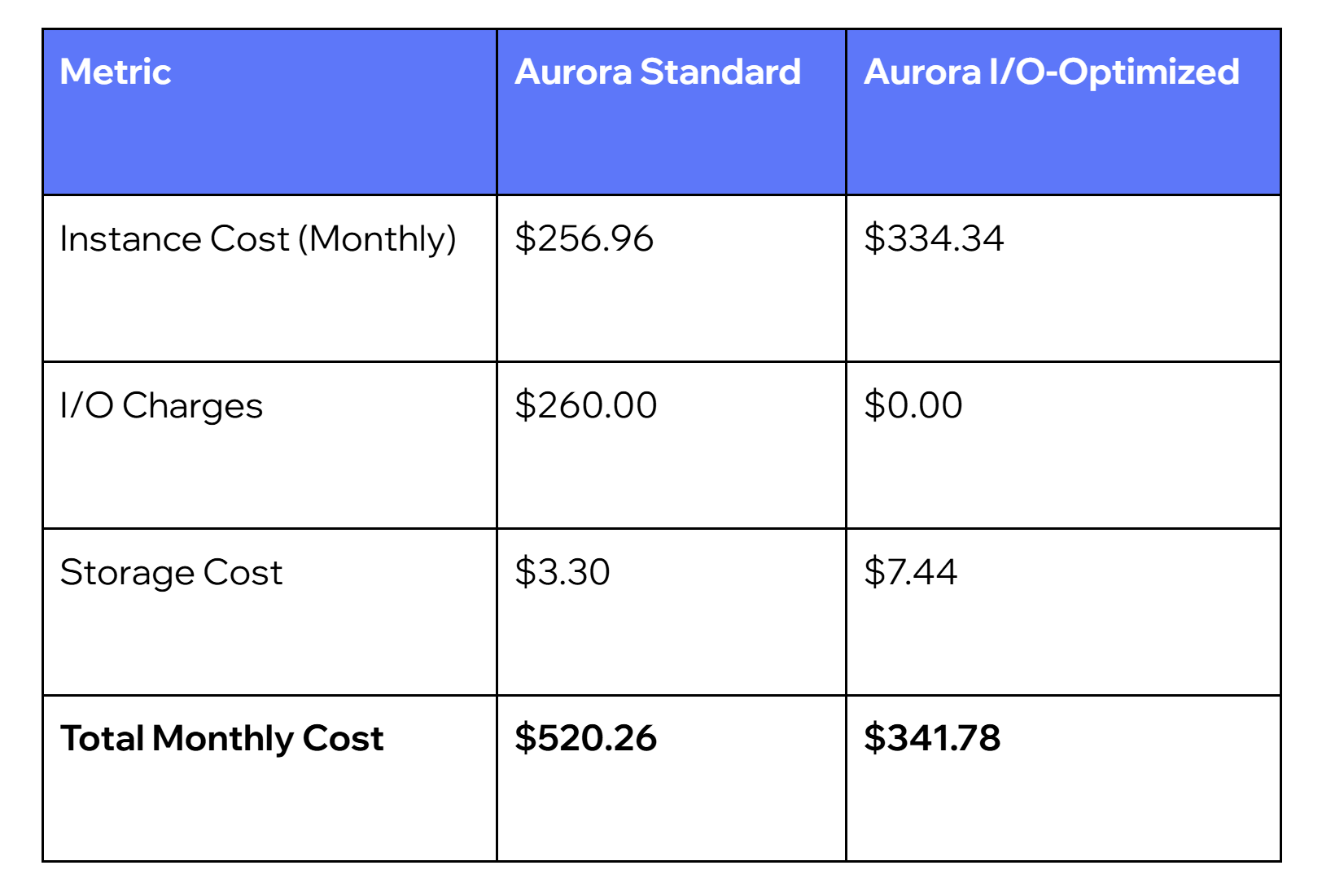
What changed: $178.48 in monthly waste was captured and eliminated, while gaining total price predictability.
Let’s imagine a different scenario - the customer is using an I/O Optimized configuration, but is this really needed? We need to calculate how much the customer would pay if he did not use the configuration. The focus should be on answering the question of the Database facing high I/O requests.
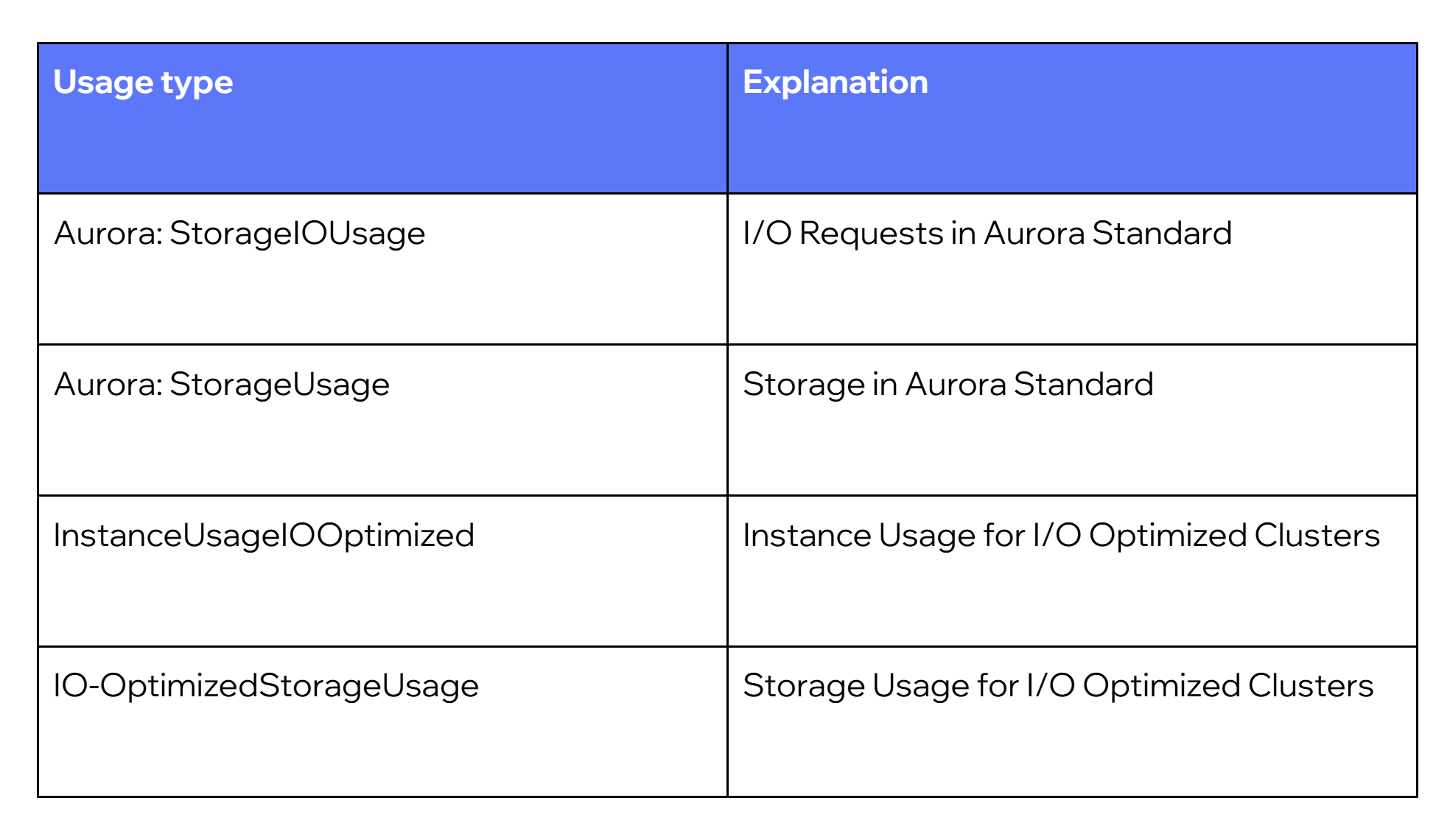
If you are starting your investigation from the billing data, you can identify if the cluster runs under Aurora I/O Optimized pricing configuration by checking the usage type. InstanceUsageIOOptimized is the usage type for instances under Aurora I/O Optimized, and Aurora: IO-OptimizedStorageUsage is the usage type for storage usage. In the billing data, you won’t see billing or usage related to the I/O request itself, as they are now free.
Then, by choosing the InstanceUsageIOOptimized usage type and filtering by resource, we will have the exact resource that is using that configuration.
As the requests are now free, they are no longer visible in the billing data, so we need to investigate the CloudWatch metrics. Doing that is relatively simple - go to Aurora and RDS in the console and find the needed cluster. Then click on Monitoring and look for the TotalIOPS metric.
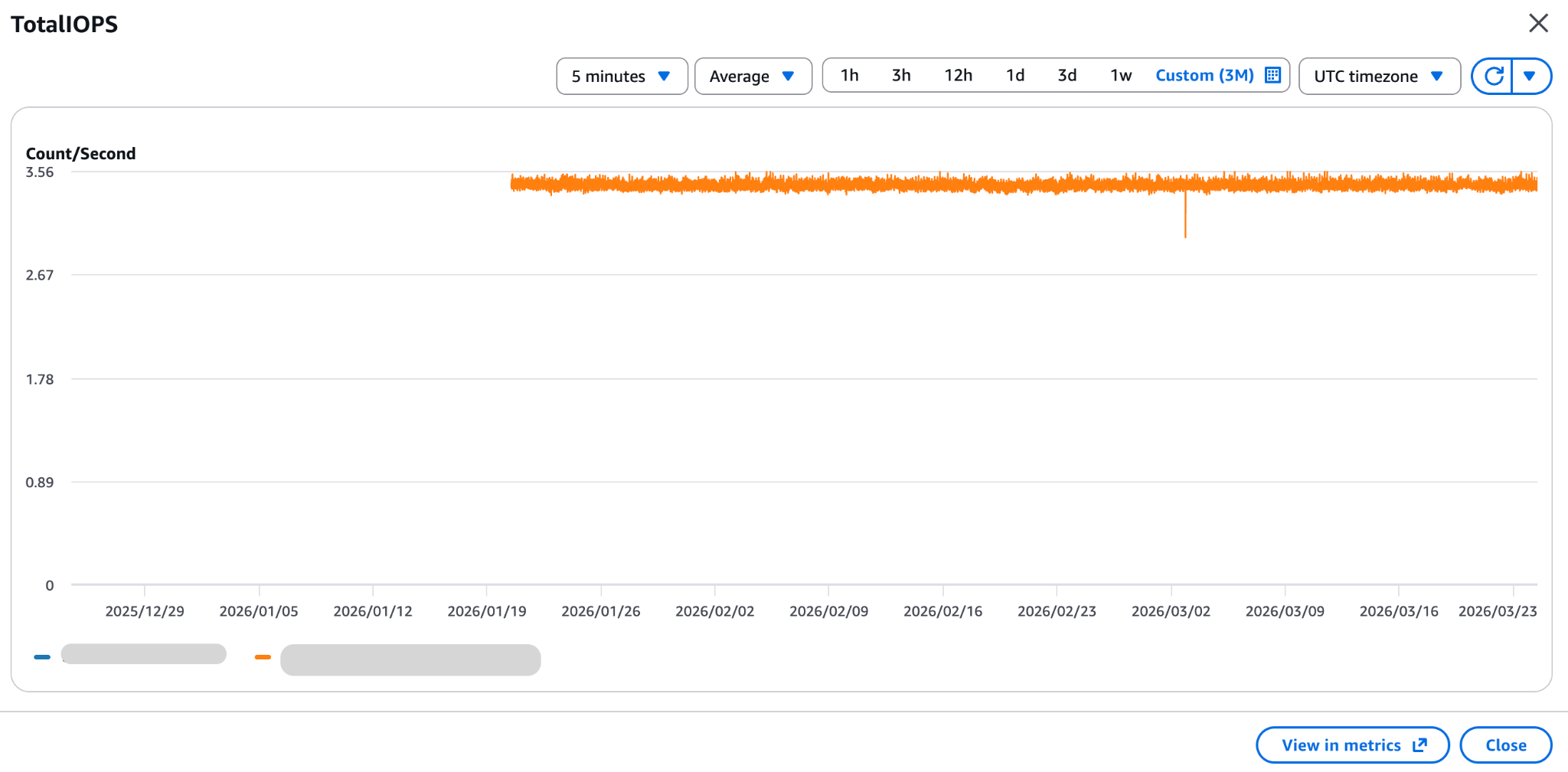
Spend some time investigating the graph and play with various timeframes. The goal is to estimate the average I/OPs per second, but also look for any spikes in the previous periods.
For example: if the cluster has 4 I/OPs per second*60*60*730= requests per month
The cluster is in Frankfurt, and the pricing is $0.22 per 1 million requests.
The price in Standard would be $1.73 per month.
We can get the number of instances and their size from CloudWatch. We can do the same for the storage. An alternative source is the cost data in Cost Explorer.
In our example, the cluster consists of a single db.t4g.large instance and 1GB of storage.
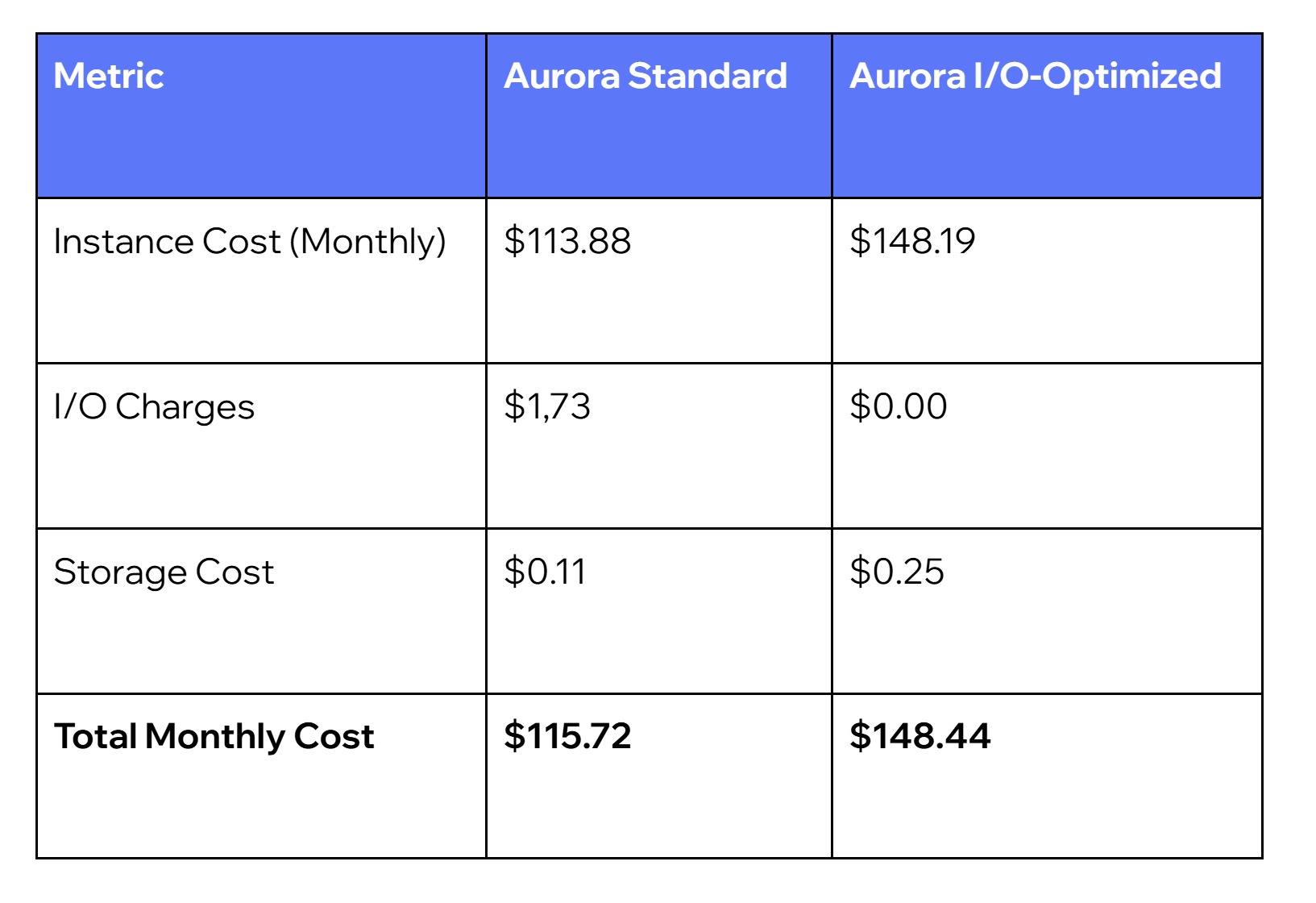
In that example, the Aurora I/O Optimized configuration is not optimal. $30 om monthly savings can be easily achieved by changing the payment configuration.
How to distinguish between the used configuration in the billing data?
In that case, the Usage Type gives more detailed information. Here is a quick cheat sheet to help you understand what configuration you have in your environment.
The Bottom Line
Aurora I/O-Optimized is a powerful efficiency tool, but it isn’t a "set and forget" solution. The key to capturing real value is understanding your specific workload patterns. If your I/O charges are high and unpredictable, the switch provides much-needed stability.
If they represent only a small fraction of your bill, the instance premium will likely outweigh the benefits. Always run the audit at the cluster level before committing to a change.


AI coding agents need better context. Selecting, compressing, and retrieving the right information can reduce waste across the entire agent workflow.

Picture a meeting room. Laptops open, screens flickering, everyone with that particular gleam in their eye. The first word in the air isn't "hello," it's "AI." And then comes the moment that always arrives: someone says, with total confidence, "We want ChatGPT. But ours. Now."


.png)