Cloud Cost Optimization: How to Reduce Spend in 2026
March 25, 2026
Table of contents
Between 28% and 50% of cloud spend goes to waste. Not because organizations are careless - but because cloud computing makes it incredibly easy to provision resources instantly, without the governance structures needed to keep cloud costs in check.
For a company spending $100,000 per month on AWS, that's $28,000–$50,000 in unnecessary charges every single month. Multiply by 12, and you're looking at an annual leak that would make any CFO reach for the phone.
Cloud cost optimization means making every dollar you spend on the cloud work for you, not sit idle, not burn through waste, not lock into the wrong pricing model. This guide covers the root causes of cloud costs spiraling out of control, the strategies that actually work, and how to build the organizational framework (FinOps) that makes optimization sustainable at scale.
In this guide:
The real definition of this discipline - and how it differs from cost-cutting
The 7 root causes of cloud waste most teams overlook
8 proven strategies with practical implementation steps
The FinOps framework that turns optimization into an ongoing discipline
How to measure and report ROI to leadership using AWS's latest efficiency metric
What Is Cloud Cost Optimization?
Cloud cost optimization is the systematic practice of reducing cloud costs while improving efficiency through enhanced cloud visibility, resource rightsizing, workload automation, and organizational accountability. Unlike simple cost-cutting, it doesn't sacrifice performance. The goal is to ensure every cloud resource serves a clear purpose and delivers measurable ROI.
Three core principles drive it:
Eliminate waste - identify and remove idle, orphaned, or over-provisioned cloud resources
Rightsize - match resource allocation to actual workload requirements, not theoretical peaks
Optimize cloud pricing - use the right pricing model for each workload type
The goal is not to spend less. It's to spend right - ensuring every dollar across your cloud environments generates proportional business value.
Why cloud waste keeps growing- and what it actually costs you
Cloud costs don't stay static. Without active governance, they compound. Here's why keeping cloud costs under control consistently ranks as a C-level priority:
Cloud Sprawl Accumulates Silently
Every sprint adds resources. Few remove them. Development environments spin up for testing and are never decommissioned. Snapshots accumulate. IP addresses go unassigned. Over time, the drift between what's running and what's actually needed becomes enormous - and expensive.
Forecasting Breaks Down Without Cloud Visibility
When Finance can't see what's running or why, accurate budgeting becomes impossible. Without proper cloud visibility, the result is reactive management: month-end reviews instead of proactive planning, and forecasts that consistently miss. Custom dashboards that surface real-time spend by team, service, and environment are the first step toward regaining control.
Cloud Costs Grow Faster Than the Business
Rapid provisioning, team turnover, and shadow IT are the primary cost drivers behind cloud costs that outpace business growth. Without active governance, the infrastructure bill becomes decoupled from business performance - even during periods of flat or negative growth.
Security and Cost Are Two Sides of the Same Problem
Every unused resource still running across your cloud environments is also a potential attack surface. Zombie resources, over-permissioned workloads, and shadow IT aren't just billing problems - they're security vulnerabilities. Eliminating unused cloud resources reduces both cost and risk simultaneously: cleaner cloud environments are more secure ones.
The 7 Root Causes of Cloud Waste
Cloud computing gives teams extraordinary flexibility - but without governance, that flexibility becomes one of the primary cost drivers. These are the seven most common sources of unnecessary spend, recognized across cloud providers and cloud environments alike:
1. Overprovisioned Compute Resources
The fear of performance issues drives teams to buy more than they need. Oversized EC2 instances, Kubernetes nodes running at 10–15% CPU utilization, RDS databases provisioned at three times the required IOPS. The resources sit mostly idle - but they bill at full capacity, around the clock.
Fix: Collect utilization metrics over 2–4 weeks, then use AWS Compute Optimizer to get rightsizing recommendations based on actual usage patterns. Combine with autoscaling to handle genuine traffic spikes.
2. Zombie Resources - Idle but Still Billing
A developer provisions a temporary server for load testing, finishes the test, and forgets to de-provision it. An administrator terminates an EC2 instance but leaves the attached EBS volume. A project ends, but the associated load balancer, Elastic IPs, and snapshots continue to run.
These zombie cloud resources accumulate silently - each one small, but collectively significant. In large cloud environments, untracked zombie resources can account for 10–15% of total spend on their own.
Fix: Implement automated resource lifecycle management. Regular cleanup scripts to identify unattached volumes, orphaned snapshots, unused Elastic IPs, and load balancers with no healthy targets.
3. Static Infrastructure for Dynamic Workloads
Provisioning for peak capacity means paying for that peak 24 hours a day, 7 days a week - even when demand drops to 10% of peak during nights, weekends, or off-season periods. This is one of the most direct and avoidable forms of cloud waste.
Fix: Implement autoscaling policies for workloads with variable demand. Use scheduled shutdowns for predictable low-usage periods - dev and staging environments don't need to run overnight or on weekends.
4. Wrong Storage Tier for the Job
Using S3 Standard for archival data accessed once a quarter. Running GP2 EBS volumes where throughput requirements don't justify the cost. Keeping production-level storage for test data. Each individual instance seems minor - together they represent a high and entirely avoidable cost.
Fix: Implement lifecycle policies that automatically move data based on access frequency: active data in S3 Standard, infrequently accessed data to S3-IA, and archival data to S3 Glacier. AWS Storage Lens provides full visibility into usage patterns and flags inefficient configurations.
5. Hidden Data Transfer Costs
Cross-region traffic, data egress to the internet, and NAT Gateway fees - these charges hide in the corners of the AWS bill and appear as a surprise every month. In multi-cloud environments, the problem multiplies: each of the major cloud providers charges differently for egress, making these cloud costs especially hard to forecast and attribute.
Fix: Audit network architecture. Minimize cross-region data movement. Use CDNs and edge caching to serve content closer to end users and reduce origin data transfer. Evaluate AWS Direct Connect for high-volume private connectivity.
6. Shadow IT and Ungoverned Provisioning
When engineers can launch an instance in 30 seconds without approval, cloud sprawl is inevitable. Resources are created for projects that never materialize, teams change and forget what they provisioned, and governance teams have no visibility into what's running or why.
Fix: Enforce tagging policies (see Strategy 3 below) and centralized governance. Set up budget alerts at the team and project level. Use AWS Organizations with Service Control Policies to enforce provisioning guardrails.
7. Wrong Pricing Model Selection
Using On-Demand pricing for every workload is one of the most common and costly mistakes in managing cloud costs. All major cloud service providers - AWS, Azure, and Google Cloud - offer significant cloud pricing discounts through reserved capacity and spot markets. Understanding cloud pricing models and matching them to workload characteristics is one of the highest-leverage levers available for reducing cloud costs.
Fix: Segment workloads by type and match each to the optimal pricing model. The framework for this is covered in detail in the next section.
8 Cloud Cost Optimization Strategies That Actually Work
1. Rightsize Before You Commit
The single most common mistake: purchasing Reserved Instances before rightsizing. Buying a 3-year RI on an instance that's 3x oversized doesn't save money - it locks in waste for three years and inflates cloud costs for the duration of the commitment.
The correct sequence is always: Analyze actual usage → Rightsize → Then commit to reservations.
Use AWS Compute Optimizer to analyze CPU, memory, and network utilization over a 14-day minimum window. Identify instances running below 40% average CPU and validate that downsizing won't impact performance under real workload conditions. Test the rightsized configuration before committing.
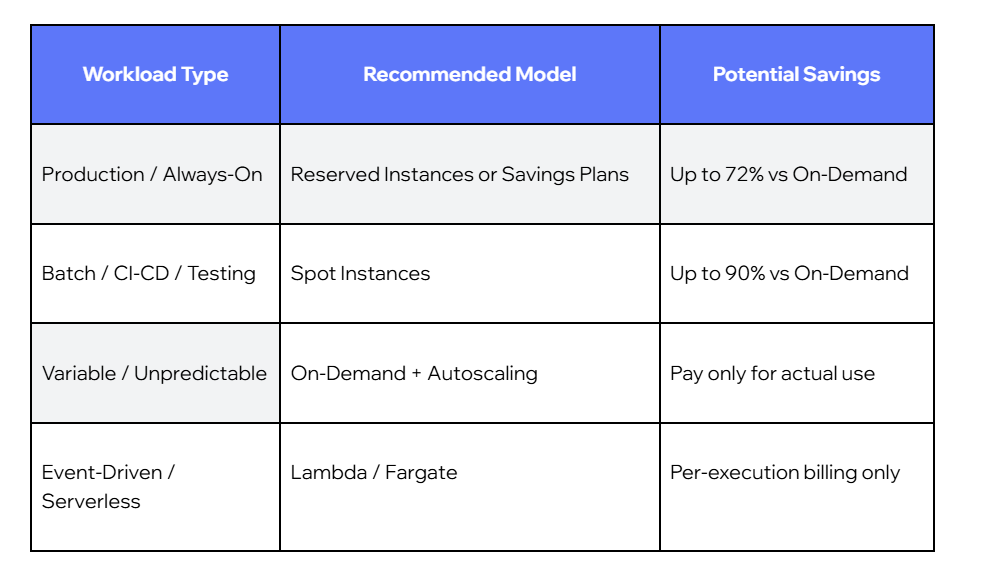
2. Match Pricing Model to Workload Type
Not all workloads are the same. Cloud providers offer multiple pricing tiers precisely because different cloud computing workloads have fundamentally different characteristics. The most cost-efficient organizations match each workload to its optimal model:
Mature FinOps teams track Effective Savings Rate (ESR) - the ratio of actual cost savings against the maximum possible savings if all eligible workloads used optimal pricing - as the primary measure of commitment efficiency.
3. Enforce Tagging and Resource Ownership
Without consistent tagging, there is no accountability. Without accountability, optimization efforts stall because no team owns the problem.
A robust tagging strategy assigns every cloud resource to an owner and a business context:
Environment (production / staging / dev / test)
Team (engineering / data / product / marketing)
Project (project name or ID)
Owner (individual or team email)
CostCenter (for financial chargebacks)
Enforce tagging through AWS Tag Policies within AWS Organizations, or through infrastructure-as-code tools like Terraform or CloudFormation. Untagged resources should trigger alerts and be flagged for review - not left to accumulate unattributed.
4. Automate Idle Resource Cleanup
Manual cleanup doesn't scale. As cloud environments grow, the gap between what should be running and what is running widens - and manual reviews can't keep pace. Automation closes that gap continuously, and cost anomaly detection adds a real-time safety net that flags unexpected spend spikes before they compound.
Key automation components:
AWS Instance Scheduler: automatically stops and starts instances on a defined schedule (dev environments off at 6 PM, back on at 8 AM)
Lambda-based cleanup scripts: identify and flag unattached EBS volumes, stale snapshots, and idle load balancers on a weekly cadence
Budget alerts: trigger notifications when spending exceeds defined thresholds at the team or project level
Cost anomaly detection: ML-powered monitoring that flags unexpected cost spikes within hours - available natively in AWS Cost Explorer
5. Implement Storage Lifecycle Policies
Storage costs grow quietly. The fix is defining explicit lifecycle rules that automate data movement based on access frequency:
Log files accessed in the last 30 days → S3 Standard
Log files 30–90 days old → S3 Standard-IA (Infrequent Access)
Log files older than 90 days → S3 Glacier Instant Retrieval
Snapshots older than 180 days → audit and delete unless business reason to retain
AWS Storage Lens provides organization-wide visibility into storage usage, identifies orphaned cloud resources, and highlights configurations generating unnecessary costs. For hybrid cloud and Azure environments, equivalent policies apply using Azure Cool Blob Storage and lifecycle management rules.
6. Measure Efficiency - Not Just Spend
Tracking monthly spend in isolation doesn't tell you whether your efforts are working. A growing company can reduce its waste percentage significantly while cloud costs rise in absolute terms, and raw spend figures will make it look like nothing improved.
AWS introduced a unified Cost Efficiency metric in November 2025 (available in Cost Optimization Hub) that gives any cloud cost optimization program a standardized, comparable score:
This metric creates a direct line from optimization activities to business outcomes - and gives FinOps teams something concrete to present to leadership beyond raw figures.
7. Integrate Cost Awareness into the SDLC
Cost surprises at month-end mean decisions were made weeks earlier without awareness. The solution is shifting left - making cloud costs a consideration at every stage of the software development lifecycle, not just a number engineering teams review after the fact.
Planning: justify infrastructure budgets, use cost data to inform architecture decisions and technical debt priorities
Build: choose instance types, storage options, and service architectures with cost in mind - not just performance
Deploy: automate tagging, configure budget alerts, and enforce naming conventions via IaC
Monitor: attribute cloud costs by feature, team, and environment; review cost per unit (per transaction, per user, per API call)
Engineering decisions carry financial consequences. Shifting cost awareness earlier means those consequences are understood - and addressed - before they appear on the bill.
8. Don't Ignore Kubernetes and Container Costs
Kubernetes has become one of the most common sources of cloud waste - and one of the least monitored. The abstraction layer between applications and infrastructure makes it easy for costs to grow unchecked:
Nodes running at 10–20% capacity because pod resource requests are set too conservatively
No resource limits on pods, leading to unpredictable node utilization
Cluster Autoscaler is not configured, meaning excess capacity is never scaled down
Multiple small clusters running in parallel, where consolidated workloads would cost significantly less
Key tools: Kubecost for container cost visibility and allocation, AWS Cost Explorer with EKS filtering for cluster-level spend, KEDA (Kubernetes Event-Driven Autoscaling) for workload-based scaling, and Karpenter for node-level autoscaling optimization.
FinOps: The Framework That Makes Optimization Stick
Strategies without organizational structure tend to fade. Teams apply a round of rightsizing, realize some savings, and then drift back toward over-provisioning as new workloads are added without governance. In multi-cloud environments - where cloud costs span AWS, Azure, and Google Cloud - the challenge is even more acute without a unifying framework. FinOps is what prevents this.
FinOps (Finance + DevOps) brings together Finance, Engineering, and Operations around a shared objective: maximizing business value from cloud spend - not just minimizing the bill.
Phase 1 - Inform: Build Shared Visibility
Every FinOps initiative starts with the same prerequisite: everyone needs to see the same data. Shared dashboards built from a single source of truth give Finance, Engineering, and Operations teams a unified view of cloud costs - broken down by team, project, service, and environment.
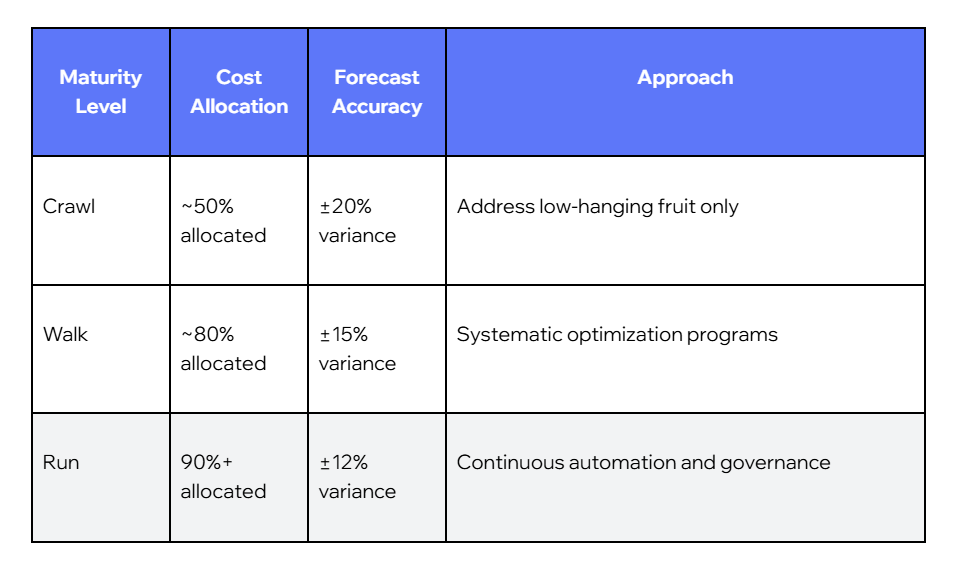
This phase focuses on cost allocation - tagging cloud resources correctly so cloud costs can be attributed to teams, projects, and business units. Mature FinOps organizations allocate more than 90% of cloud costs to specific owners, leaving less than 10% unattributed.
Phase 2 - Optimize: Act on the Data
With full visibility in place, the organization can systematically implement the strategies above: rightsizing, commitment purchasing, idle resource cleanup, storage lifecycle policies, and SDLC integration.
The key distinction from ad-hoc reduction is that Optimize is a continuous process. New resources are provisioned constantly; cloud costs shift with every deployment. Optimization must keep pace.
Phase 3 - Operate: Measure and Improve Continuously
The Operate phase establishes the KPIs that make this a permanent discipline rather than a quarterly project. Key metrics to track:
The FinOps Foundation's maturity model provides a useful benchmark for where an organization sits in its journey:
Building a FinOps Culture
The most sophisticated tooling fails without cultural alignment. As cloud computing environments scale, cloud costs become a shared responsibility - not the concern of a single team. The organizations that sustain optimization well share several characteristics: engineers understand how their decisions impact the bill; cost visibility is part of the daily workflow; Finance and Engineering meet regularly to align on priorities.
FinOps is not a cost-cutting initiative. It's a discipline that enables teams to move faster with confidence - knowing that growth is intentional and financially accountable. Sustainable optimization happens only when it's embedded into how teams work, not imposed as an external constraint.
How CloudZone Helps You Optimize AWS Cloud Costs
As an AWS Premier Partner, CloudZone brings a data-driven, structured approach to reducing cloud costs for organizations running on AWS and across cloud providers. We combine deep technical expertise with FinOps methodology to deliver measurable, sustainable savings.
What We Do
AWS Cost Assessment - a comprehensive audit of your current environment, identifying immediate optimization opportunities and quantifying potential savings across all cloud resources
FinOps Implementation - building the visibility infrastructure: tagging strategy, shared dashboards, budget governance, and cost allocation frameworks
Commitment Strategy - rightsizing workloads first, then planning and purchasing Reserved Instances and Savings Plans to reduce cloud costs aligned to actual usage patterns
Ongoing Optimization - continuous rightsizing, automated cleanup, monthly cost reviews, and KPI tracking across cloud providers
Need an example?
Playtech BI, the BI and analytics division of global gambling technology leader Playtech, was watching EC2 costs grow fast, with nearly 80% of their AWS spend going to compute and limited visibility into what was driving it.
We joined forces, and within a year, CloudZone reduced its monthly EC2 costs by 53% and cut total compute hours by 28%. Performance stayed intact throughout.
See exactly where your cloud budget is going. Get a free AWS cost assessment from CloudZone's FinOps team.
FAQs
What is the difference between cloud cost optimization and cloud cost management?
Cloud cost management focuses on tracking, reporting, and allocating cloud costs - understanding what you're paying for. Cloud cost optimization goes further: it's the active process of reducing waste, improving efficiency, and ensuring spend is aligned with business value. Management is the foundation; optimization is what you build on it.
How much can organizations save on cloud costs?
Most organizations that implement systematic programs achieve savings of 15–35% on their cloud costs. Organizations with mature FinOps practices - covering 90%+ of spend and running continuous optimization - often report savings of 40–50%. The exact number depends on the starting level of waste, workload characteristics, and commitment strategy.
Should I rightsize before buying Reserved Instances?
Yes - always. Purchasing a Reserved Instance on an oversized instance locks in inefficiency for 1–3 years. Even at a 60–70% discount on cloud pricing, you're paying for capacity you don't need. The correct sequence is: Analyze actual utilization → Rightsize → Then commit to reservations on the rightsized configuration.
What is FinOps, and how does it relate to cloud cost management?
FinOps (Finance + DevOps) is the organizational framework that makes cloud cost optimization work at scale. It brings Finance, Engineering, and Operations together around shared visibility, shared accountability, and shared goals. Without FinOps, optimization tends to be ad hoc and temporary. With it, it becomes a continuous, embedded discipline.
What AWS tools help manage cloud costs?
AWS offers a strong native toolset - and among cloud service providers, it's one of the most comprehensive: Cost Explorer for historical analysis and anomaly detection; Compute Optimizer for rightsizing recommendations based on ML; Cost Optimization Hub (including the new Cost Efficiency metric introduced in November 2025); Trusted Advisor for real-time efficiency recommendations; and Instance Scheduler for automated stop/start management. CloudZone helps organizations extract full value from these tools within a structured FinOps program.
More from CloudZone
Nir Shiloni
August 4, 2026
RAG, Fine-Tuning, or Prompt Engineering: Choosing the Right Approach
Picture a meeting room. Laptops open, screens flickering, everyone with that particular gleam in their eye. The first word in the air isn't "hello," it's "AI." And then comes the moment that always arrives: someone says, with total confidence, "We want ChatGPT. But ours. Now."
AI
Gavriel Magliner
September 15, 2026
The Government That Ships Like a Startup: Enterprise GitOps on AWS
How a large government enterprise deployed a zero-touch, identity-first GitOps platform on AWS, and what every enterprise CTO should take from it.
AWS
Danny Farber
September 1, 2026
Decision Architecture Framework (DAF): The Missing Layer Between AI and Enterprise Software
Software has always been built by encoding decisions into code. Artificial intelligence gives us the opportunity to separate decision-making from implementation for the first time.




.png)











.png)