Mastering Vertex AI: A FinOps Approach to Cost-Efficient AI on GCP
Vera Barzman
May 10, 2026
Table of contents
As organizations increasingly adopt generative AI, most teams discover the cost problem after they've already deployed. Here's how to get ahead of it. Teams working with Google Cloud Vertex AI often discover that without a structured approach, costs can scale quickly and unpredictably.
A well-designed workflow helps organizations balance performance, quality, and cost control from the very beginning. Below is a practical approach to using Vertex AI with optimization in mind.
Start with Model Garden: Make Cost-Aware Decisions Early
The process begins with defining the use case and exploring models in Model Garden. This stage is critical not only for selecting the right capabilities, but also for understanding cost implications.
There are a few key pricing principles to keep in mind:
Charges apply only to successful requests (HTTP 200 responses)
Most models are priced per token, but some use different units:
Imagen is priced per image
Veo is priced per video second
Understanding the pricing unit is essential, as it directly impacts how usage should be monitored and controlled.
Choosing the Right Model
Model selection is the most impactful cost decision. Not every use case requires the most advanced model.
A structured evaluation process should include:
Benchmarking multiple models such as Gemini 2.5 or Llama 4 against the specific use case
Evaluating whether a lower-cost model delivers sufficient quality
Segmenting workloads by complexity, routing simpler tasks to cheaper models and reserving more expensive models for advanced scenarios
This type of “routing” or “waterfall” architecture is one of the most effective ways to control costs at scale.
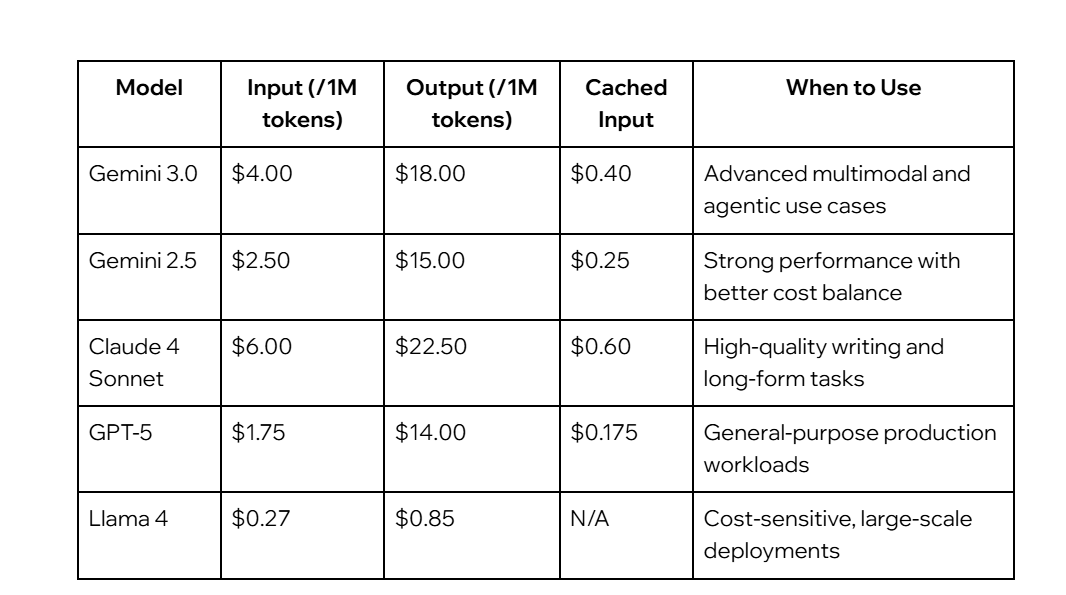
Model Pricing Considerations
Pricing varies significantly between models, making comparison essential.
For highly cost-sensitive workloads, lighter models such as Gemini Flash Lite may provide sufficient performance at a significantly lower price point.
Move to Vertex AI Studio: Iterate Efficiently
After selecting a model, the next step is working in Vertex AI Studio.
This stage focuses on:
Designing and refining prompts
Configuring model parameters
Validating outputs
Efficient iteration here reduces the risk of costly inefficiencies later in production. Poorly designed prompts or excessive token usage can significantly increase operational costs over time.
Optimize for Production: Control Cost at Scale
Before deploying workloads, optimization becomes essential. At production scale, even small inefficiencies can result in substantial cost increases.
Budget Monitoring
Setting budget alerts is a foundational step. It ensures visibility into usage trends and helps detect anomalies early.
Context Window Management
The size of the context window directly affects token consumption. Larger inputs increase costs, so it is important to align context size with actual requirements rather than defaulting to maximum limits.
Prompt Caching
Many applications generate repeated or similar queries. Prompt caching can reduce redundant processing and lower costs.
Key practices include:
Identifying frequently repeated queries through logs
Defining a Time-to-Live (TTL) to balance freshness and efficiency
It is important to note that caching primarily reduces input token costs.
Batch and Asynchronous Processing
For non-production workloads, batching and asynchronous execution can significantly improve cost efficiency. This is particularly useful in testing environments, background jobs, or large-scale data processing tasks.
Extending the Strategy: Gemini in the Workplace
Beyond Vertex AI, organizations may also consider Gemini Enterprise as part of a broader AI adoption strategy.
Gemini Enterprise integrates AI capabilities into tools such as Gmail, Docs, Sheets, and Meet, while maintaining enterprise-grade security and administrative controls.
It is offered in multiple editions:
Business edition, suited for smaller teams with minimal setup requirements
Standard and Plus editions, designed for larger organizations requiring centralized IT governance
Pricing typically starts at approximately $21 per user per month for Business, and $30 per user per month for higher-tier plans.
Conclusion
Optimizing AI usage on GCP requires more than selecting a model and deploying it. It involves a deliberate approach across the entire lifecycle:
Selecting the right model based on cost and performance
Iterating efficiently during development
Implementing cost controls before scaling to production
Organizations that embed these practices early are better positioned to scale AI workloads sustainably while maintaining financial control.
FAQs
What is Vertex AI on GCP?
Vertex AI is Google Cloud’s AI platform that allows organizations to build, test, and deploy AI workloads using models available through Model Garden and Vertex AI Studio.
Why is cost optimization important when using Vertex AI?
Without a structured approach, Vertex AI costs can scale quickly and unpredictably, especially as organizations increase their use of generative AI workloads.
What is Model Garden in Vertex AI?
Model Garden is the stage where organizations explore and evaluate available AI models based on their use case, capabilities, and pricing considerations.
Why is model selection important for cost control?
Model selection is one of the most impactful cost decisions because not every workload requires the most advanced or expensive model.
Which model is recommended for cost-sensitive deployments?
The article highlights Llama 4 and Gemini Flash Lite as options for highly cost-sensitive workloads.
More from CloudZone
Nir Shiloni
August 4, 2026
RAG, Fine-Tuning, or Prompt Engineering: Choosing the Right Approach
Picture a meeting room. Laptops open, screens flickering, everyone with that particular gleam in their eye. The first word in the air isn't "hello," it's "AI." And then comes the moment that always arrives: someone says, with total confidence, "We want ChatGPT. But ours. Now."
AI
Gavriel Magliner
September 15, 2026
The Government That Ships Like a Startup: Enterprise GitOps on AWS
How a large government enterprise deployed a zero-touch, identity-first GitOps platform on AWS, and what every enterprise CTO should take from it.
AWS
Danny Farber
September 1, 2026
Decision Architecture Framework (DAF): The Missing Layer Between AI and Enterprise Software
Software has always been built by encoding decisions into code. Artificial intelligence gives us the opportunity to separate decision-making from implementation for the first time.














.png)